


Quick Q& A:
Q: Why does the description say battery operated and rechargeable?
A: We recently updated this mouse. V1 was battery operated and single channel, V2 is now rechargeable and multi-channel.
Q: How long will my batteries last before I need to change them?
A: Depending on use, the batteries can last approximately 1-2 months.
Q: When do I know if the battery is low (both batteries and rechargeable)?
A: You will see a blinking red LED light near the scroll wheel.
Q: How do I know if the battery is fully charged (rechargeable version)?
A: The red LED light near the scroll wheel will turn off.
Q: How long does it take for a full charge?
A: Approximately 1.5-2 hours.
Q: What does the DPI button do?
A: This controls the speed at which your mouse cursor moves on your computer screen.
Q: What if I'm left handed?
A: You can swap the left and right click in your mouse settings to accommodate your needs.
How do I set up my mouse on an Apple device?
If you have the V1 mouse (battery operated, see below)
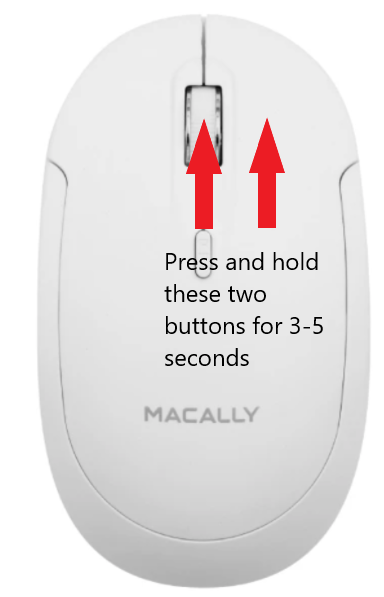
- Open Settings > Bluetooth (leave this screen open).
- Turn mouse on.
- Press and hold the scroll wheel and right click down simultaneously for 3-5 seconds.
- 'BTDYNAMOUSE' should pop up under Nearby Devices, press connect.
How to pair on a non-Apple product
If you have the V1 mouse (battery operated, see below)
- Open Settings > Bluetooth (& devices) - leave this screen open.
*If you are on a Windows device click on 'Add device' > Click first option for mice & keyboard
- Turn mouse on.
- Press and hold the scroll wheel and right click down simultaneously for 3-5 seconds.
- 'BTDYNAMOUSE' should pop up under Nearby Devices, press connect.
How do I set up my mouse on an Apple device (this includes iPads, iPhones and all Mac devices)?
If you have the V2 mouse (rechargeable, see below)

- Open Settings > Bluetooth (leave this screen open).
- Turn mouse on.
- The mouse comes in pair mode (rapid blinking light) on B1.
- 'Bluetooth X3 Mouse' should pop up under Nearby Devices, press connect.
How do I set up my mouse on a non-Apple product (this includes tablets and Windows devices)?
If you have the V2 mouse (rechargeable, see below)
- Open Settings > Bluetooth (& devices) - leave this screen open.
*If you are on a Windows device click on 'Add device' > Click first option for mice & keyboard
- Turn mouse on.
- The mouse comes in pair mode (rapid blinking light) on B1.
- 'Bluetooth X3 Mouse' should pop up under Nearby Devices, press connect.
How do I connect my mouse to 3 different devices (V2)?
To pair to channel 1, follow the steps above according to the type of device you are using.
Again, depending on the device you are trying to pair the mouse to, you will need to have your Bluetooth settings open.
To pair to channel 2, press the pair button once, and the light should move down to B2 - it is already in pair mode and will pop up under Nearby devices, press connect.
To pair to channel 3, press the pair/push button once, and the light should move down to B3 - it is already in pair mode and will pop up under Nearby devices, press connect.
Note: Once all the channels are connected to your devices, you can press the pair/push button once to change between channels. It will automatically connect after a few blinks the light will go bold when connected.
I can't see a cursor on my iPhone/iPad, although it is connected
You will need to activate Assistive Touch.
Settings > Touch > Please check/toggle on the Assistive Touch option.
How do I adjust the DPI?
If you are on a Mac, you will need to manually adjust this by:
Going to Settings > Mouse > Adjust the Tracking speed to the left to slow down, to the right to speed up.
If you are on a PC, you can press the DPI button and each time pressed will either increase or decrease. You can press and then move your mouse to test the speed at which your DPI level is set.
What if my mouse isn't working?
- Make sure it's charged (or change batteries)
- If the device is listed in your Device list under Bluetooth, try manually connecting it.
- If the device is listed in your Device list and will not connect, you may have to remove/forget the device and re-sync.
- If the device is no longer listed in your Device list, it may have lost connection and needs to be re-synced.